

I got tired of my kid asking me to "install mods" so I built a whole Minecraft server manager. It's free.
TL;DR: I'm a dad who hosts Minecraft servers for my kid and their friends. I got sick of SSH-ing into a box every time someone wanted a new modpack, so I rebuilt mineos.net from the ground up — a free, open-source web UI that lets you create, manage, and mod Minecraft servers from your browser. One-command install, Docker-based, runs on basically anything. My 13-year-old can use it. Your 13-year-old can probably use it too.
(Quick naming note: mineos.net is named for the .NET (C#) backend — which also happens to be the domain. The repo is called mineos-sveltekit because the frontend is SvelteKit.)
Standing on the Shoulders of Giants
Before I get into my version, I want to give a huge shoutout to hexparrot (William Dizon), who created the original MineOS. That project was a lifesaver for the self-hosting community for years and is honestly what got me hooked on the idea of a web-based Minecraft server manager in the first place. Hexparrot has since retired his version, but the impact it had on the community was massive. I decided to rebuild mineos.net from scratch with a modern tech stack to carry that torch forward. This is a completely new codebase — not a fork — but the spirit is the same: make Minecraft server hosting accessible to everyone. So — thank you, hexparrot. Your work inspired all of this.
The Origin Story (a.k.a. "Dad, can you add Forge?")
It started the way these things always start. My kid wanted to play Minecraft with friends. Cool, I'll spin up a server. No problem.
Then it was "can you install Forge?" Then "can you add this mod?" Then "actually can you make a SECOND server with a different modpack?" Then their friend's parent messaged me asking if I could host one for their kid too.
Before I knew it, I was managing multiple Minecraft servers from the command line like some kind of mass-producing block game sysadmin. Editing server.properties in vim at 10pm on a Tuesday because someone wanted to change the difficulty to Hard.
There had to be a better way.
So I rebuilt one from scratch. Well — me and a very patient AI.
What Is mineos.net?
mineos.net is a web-based Minecraft server manager. You open it in your browser, and you can:
- Create servers in a few clicks (Vanilla, Forge, Paper, Fabric, Spigot, and more — with Bedrock support coming soon)
- Install mods directly from CurseForge or Modrinth without touching a file system
- Start, stop, restart servers with buttons instead of terminal commands
- Manage players — whitelist, ban, OP, the works
- Back up worlds and restore them when things go sideways (and they will)
- Monitor performance — see TPS, memory usage, player counts in real time
- Give your kids (or their friends' parents) their own accounts with limited permissions
It looks like this:
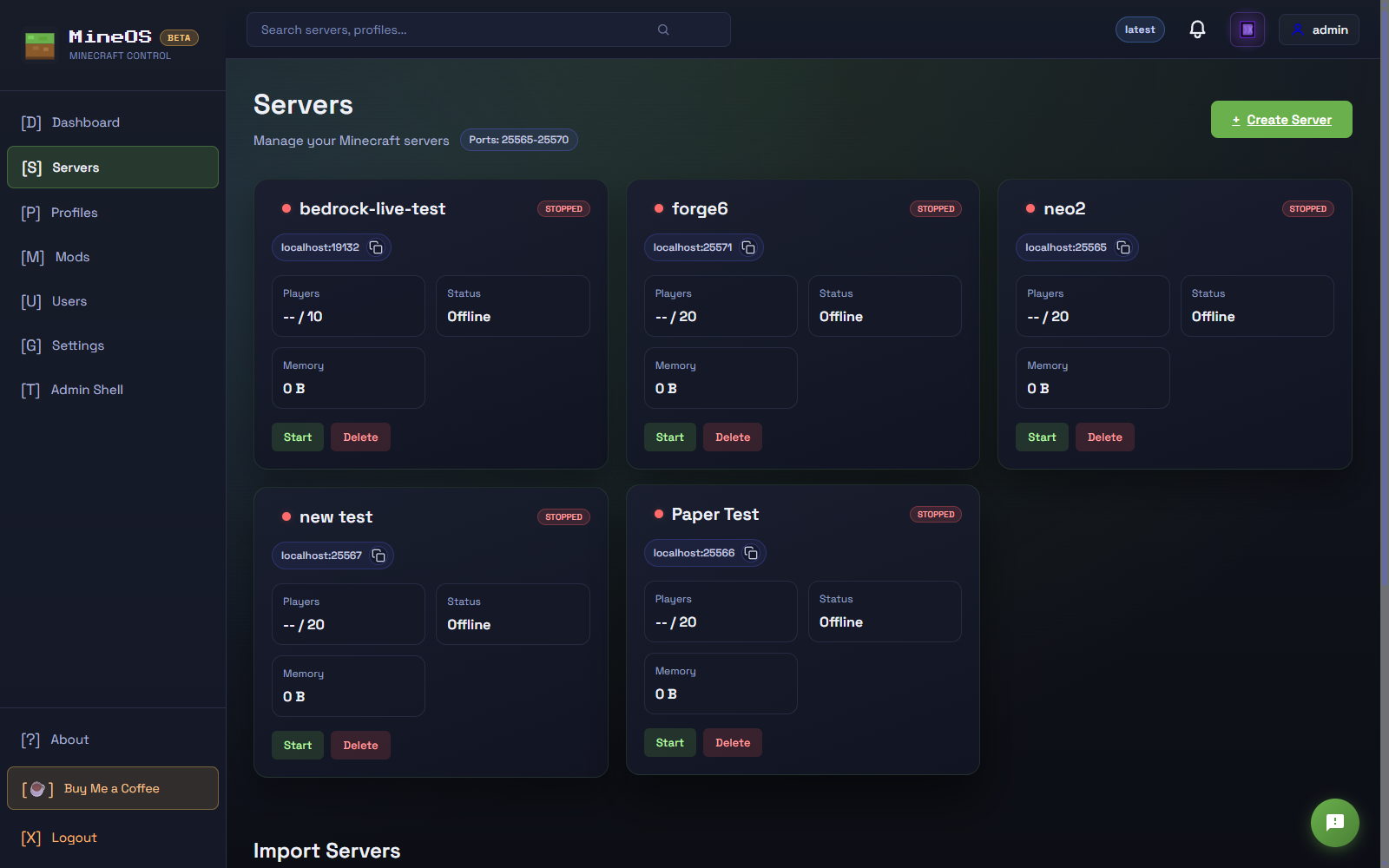
All your servers at a glance with status indicators, player counts, and quick-action buttons. Green means running. Red means someone crashed it with too many TNT cannons.
The "My Kid Can Do It" Test
Here's what I'm most proud of: my teenager can actually use this thing.
Creating a new server is a guided process. Pick a name, pick a server type, pick a version, done.
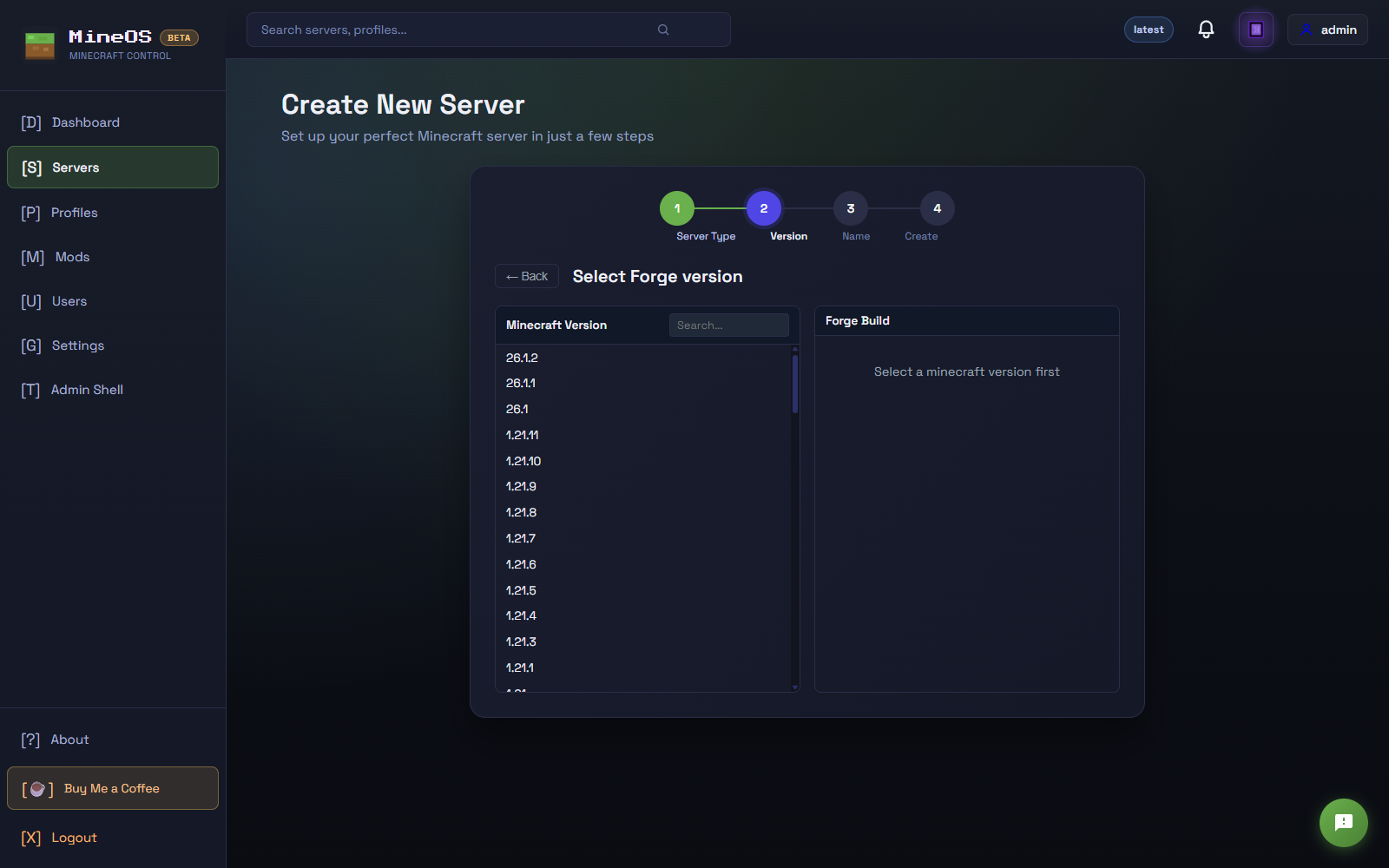
Step-by-step guided server creation. Pick a server type, pick a loader (if modded), pick a version, name it, done.
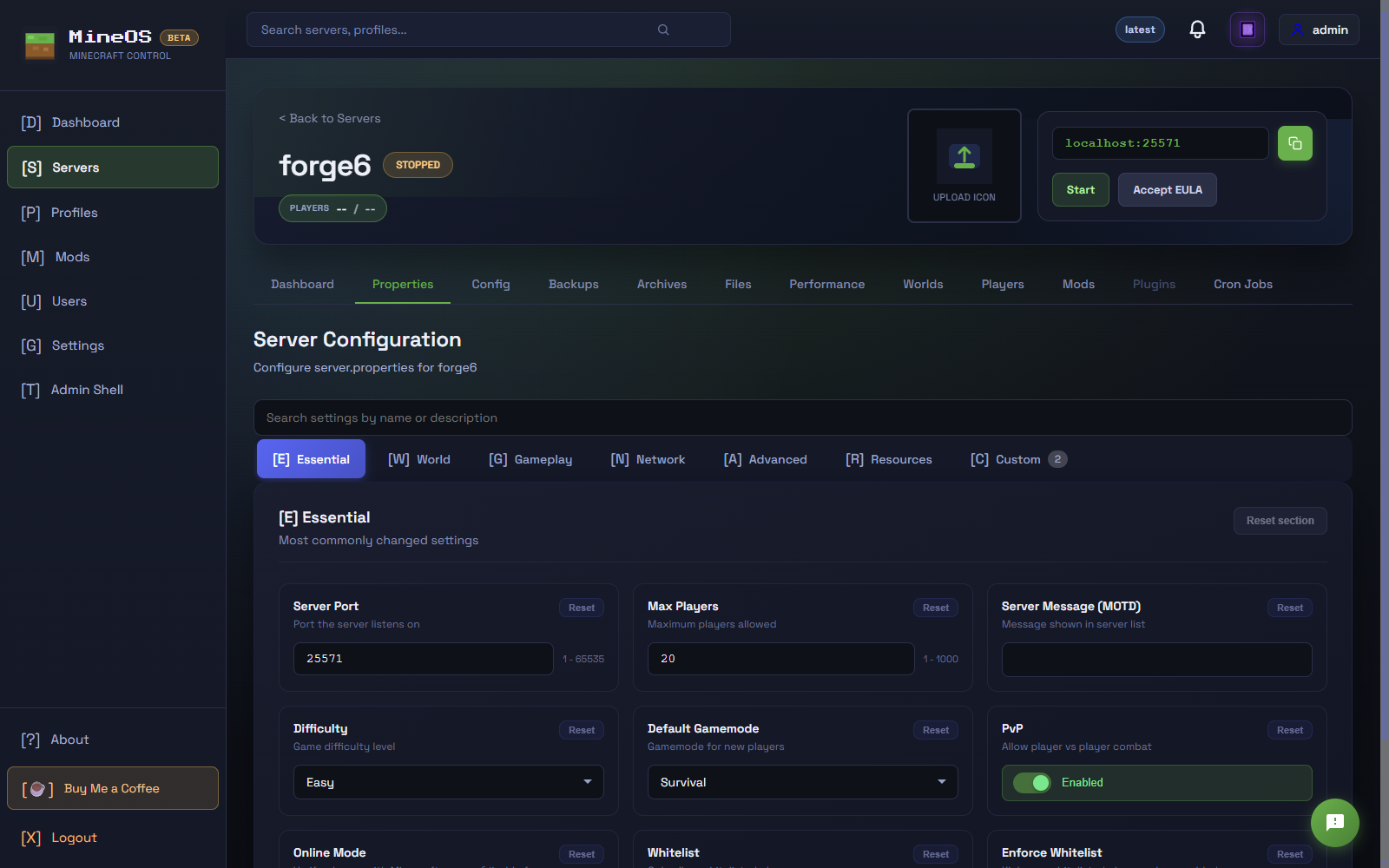
Setting up game properties like difficulty, gamemode, max players — no more editing server.properties in vim at 10pm on a Tuesday.
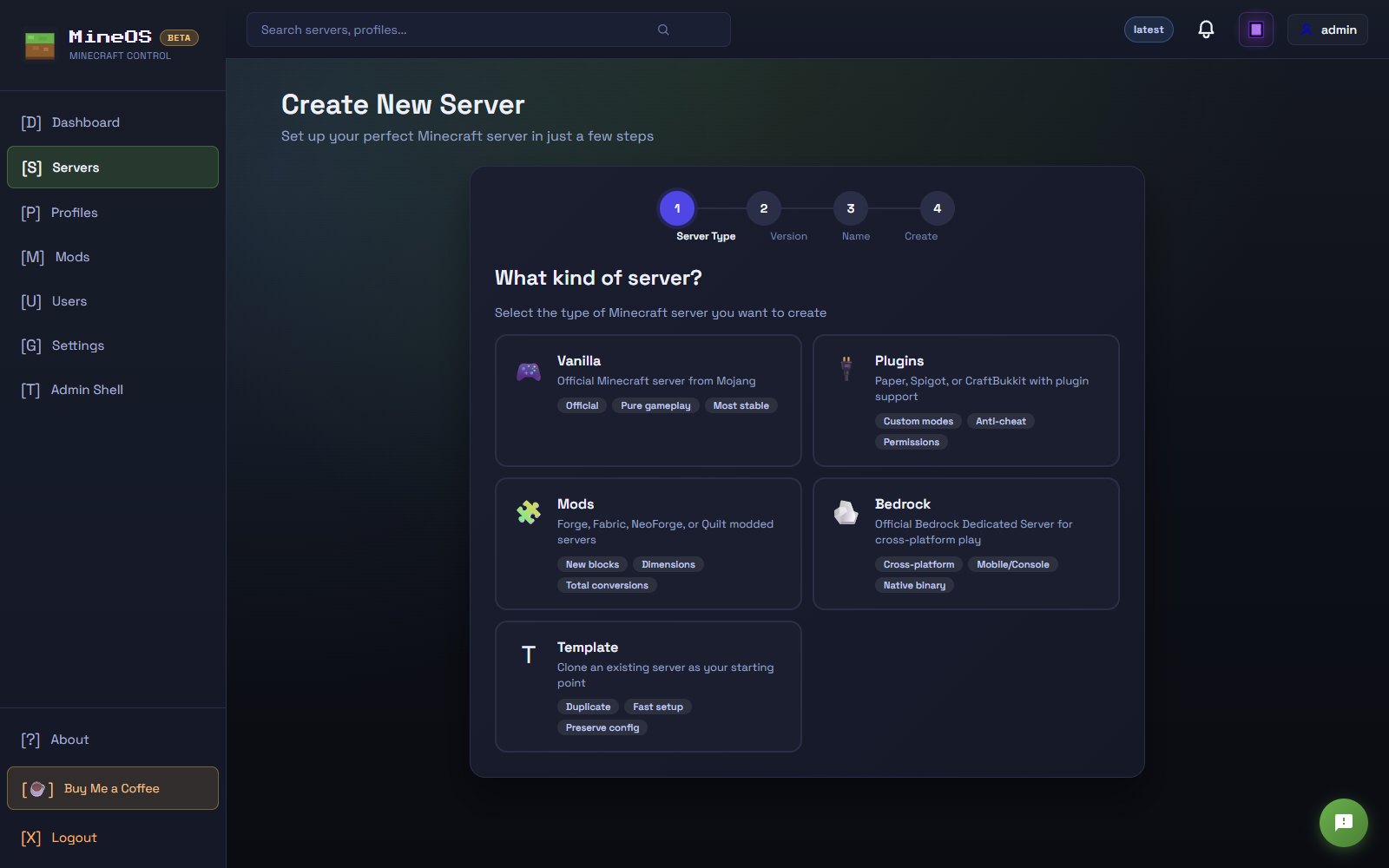
Choose from Vanilla, Plugins (Paper/Spigot/CraftBukkit), Mods (Forge/Fabric/NeoForge/Quilt), Bedrock, or clone an existing server as a template.
Want Forge mods? There's a built-in mod browser that pulls from CurseForge and Modrinth. Search for a mod, click install. That's it. No downloading JARs, no dragging files into folders, no "dad it says ClassNotFoundException."
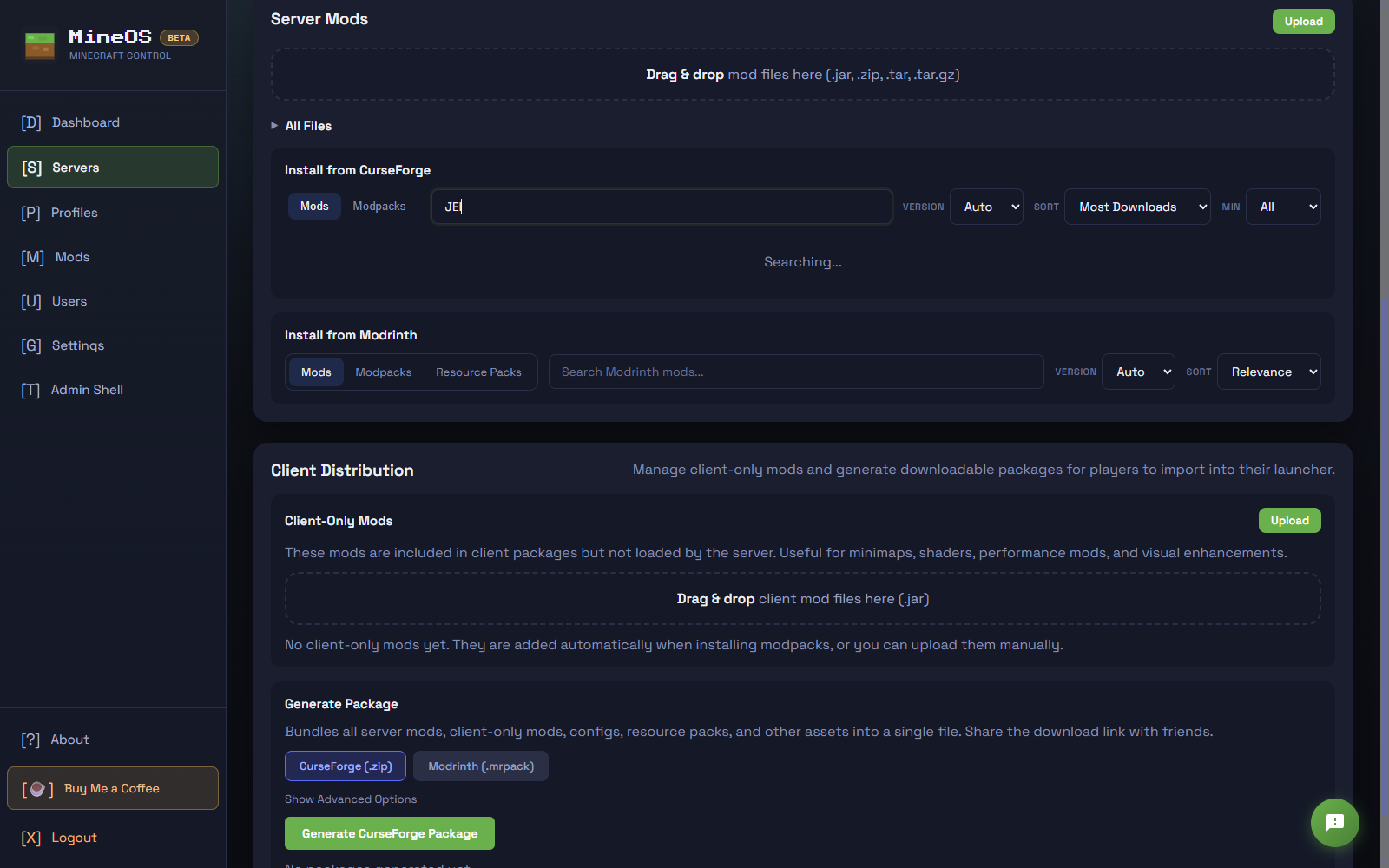
One-click mod installation from CurseForge and Modrinth, right in the browser. Search, click install, done.
I've actually been using this as a teaching tool. My older kid and a couple of their friends are learning:
- Basic server administration
- How mods and plugins work
- What ports are (and why you can't run two things on the same one)
- How to read logs when something breaks
- The ancient art of "have you tried restarting it"
It's genuinely been a great way to sneak in some tech education while they think they're just playing Minecraft.
The Setup (It's Stupid Easy)
You need one thing: Docker. That's it.
Head over to mineos.net for the full details, but the short version is a single command:
Linux / macOS:
curl -fsSL https://mineos.net/install.sh | bash
Windows (PowerShell):
iwr https://mineos.net/install.ps1 -useb | iex
That's it. One line. The installer downloads a Go-based CLI tool that walks you through setup — Docker validation, config, database, startup, the works. When it's done, open http://localhost:3000 and you're in. You can also use that same CLI to stop, restart, update, or uninstall mineos.net later.
No Java to install. No PATH variables to set. No "which JDK version do I need." Docker handles all of that inside the container.
It also starts automatically when Docker starts, so after a reboot your servers just... come back. Like magic. Parent-friendly magic.
Features That Actually Matter (To Parents)
User Accounts With Permissions
You can create accounts for other people and control exactly what they can do. Want your kid to be able to start/stop the server but not delete it? Done. Want another parent to be able to manage the whitelist but not touch the console? Done.
Backups
One-click backups. One-click restore. Because someone is going to "accidentally" blow up the spawn point with 400 blocks of TNT and then look at you with puppy eyes asking if you can fix it.
Real-Time Console
Full server console in the browser. Send commands, watch logs, see what's happening. Useful for debugging, or for catching who actually griefed the house.
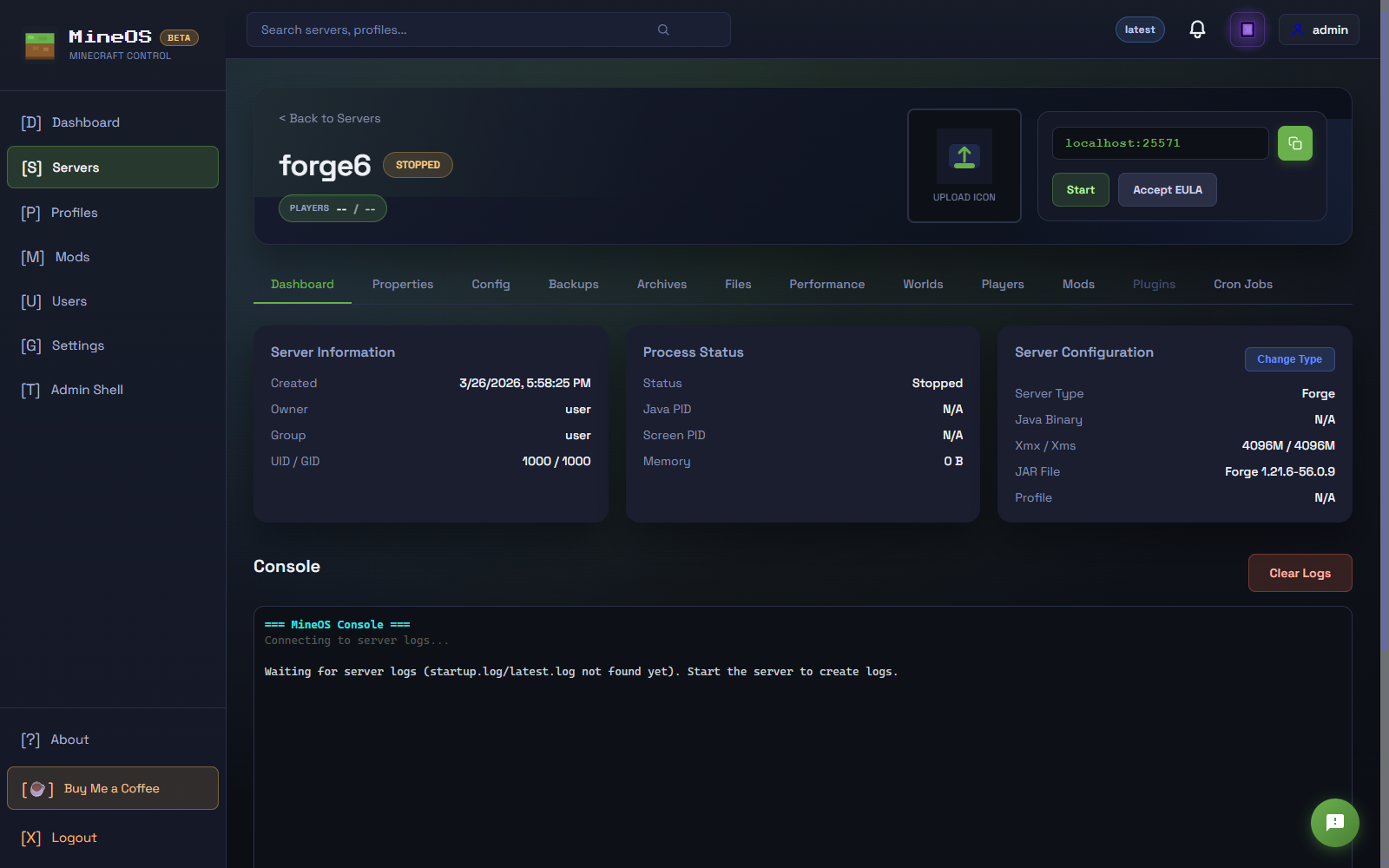
Console, players, performance monitoring all in one place. Live terminal in the browser for sending commands and tailing logs.
Whitelist Management
Add and remove players right from the UI. No more editing JSON files.
Discord Notifications (Coming Soon)
Discord webhook notifications are on the way — get pinged when servers start, stop, or when players join. Because sometimes you just want to know your kid is playing Minecraft instead of doing homework. (I'm kidding. Mostly.)
Multiple Server Types
Vanilla, Forge, Fabric, Paper, Spigot, BungeeCord, FTB modpacks... if it runs Java Minecraft, mineos.net probably supports it. Bedrock support is coming soon too!
"But I'm Not Technical"
That's kind of the whole point. I rebuilt this because I am technical and I was still annoyed by how much work it was. If you can install Docker Desktop (it's a normal app installer, next-next-finish style) and double-click a script, you can run mineos.net.
And if you ARE technical — the whole thing is open source. SvelteKit frontend, ASP.NET Core API, Go CLI for installation and management, Docker Compose orchestration. Fork it, hack on it, submit a PR. It's all on GitHub.
What It Runs On
Basically anything that runs Docker:
- An old laptop sitting in the corner
- A NAS (UNRAID and Synology support coming soon!)
- A Raspberry Pi (if you're feeling adventurous)
- A cloud VM (AWS, Azure, whatever — just open the ports)
- Your main PC (if you don't mind it running in the background)
I personally run it on an old desktop that was collecting dust. Handles 3-4 servers with mods no problem.
Built With AI Assistance
I'll be upfront: a significant chunk of this project was written with AI assistance — specifically Claude (Anthropic). I'm a .NET developer by trade, so the C# API is my wheelhouse. The SvelteKit frontend and Go CLI were both new territory for me, and AI helped fill those gaps considerably.
I still had to figure out what to build, test everything, debug the actual failures, and make judgment calls about what matters. The AI writes bugs too — I've fixed plenty of them. But I couldn't have shipped something this full-featured across three tech stacks on a parent's schedule without it.
If you want to contribute, the code is on GitHub and pull requests are genuinely welcome. Issues too — you know what's missing better than I do.
The Roadmap
This is actively maintained. Here's what's in the pipeline:
- Scheduled start/stop — cron job support so servers can spin up before game time and shut down at bedtime automatically
- Server update alerts — get notified in the UI when a new Minecraft or mod loader version is available for your server
- GeyserMC support — let Bedrock players (mobile/console) connect to your Java server without a separate server
- BungeeCord / Velocity — proxy support for running multiple servers as a network
- Discord notifications — get pinged when servers start, stop, or players join
- OAuth login — sign in with Discord or Google instead of a username/password
- Invite links — send a link to a friend, they click it, they're automatically whitelisted
- Mod dependency auto-resolution — no more "you need Library X for this mod to work"
- Add mods during server creation — so you don't have to go back and add them one by one after setup
- UNRAID / Synology app — first-class NAS support for the home server crowd
Can I See It / Try It?
- Website: mineos.net — install instructions, feature overview, everything you need
- GitHub: github.com/freeman412/mineos-sveltekit
- License: Open source and free
If you try it out, I'd genuinely love to hear how it goes. File an issue if something breaks, or just drop a comment. I'm one dad building this in my free time, so every bit of feedback helps.
FAQ
Q: Is this the same as the old MineOS?
A: Same name, completely new project. The original MineOS by hexparrot was awesome and inspired this, but he's since retired it. I rebuilt mineos.net from scratch with a modern tech stack. Started as a fork — now a full rewrite for 2025 and beyond.
Q: Does it cost anything?
A: Nope. Free. Open source. No premium tier, no "pay to unlock more than 2 servers," none of that.
Q: Can my kid break anything important?
A: With the right permission settings, the worst they can do is crash their own Minecraft server. Which they will. And that's fine. That's how they learn.
Q: Does it work with Bedrock / mobile Minecraft?
A: Not natively yet, but GeyserMC support is coming — that lets Bedrock players connect to a Java server. Native Bedrock server support is on the longer-term list.
Q: How many servers can I run?
A: As many as your hardware can handle. Each Minecraft server wants ~1-2GB of RAM minimum, so plan accordingly.
Q: Can I access it from outside my house?
A: Yes — set up port forwarding on your router (or use a cloud VM) and you can manage your servers from anywhere. You can put a reverse proxy like Nginx or Caddy in front of it for HTTPS too.
If this helps even one other parent avoid the "dad can you SSH into the server and install OptiFine" phone call at dinner, it was worth it.
mineos.net | GitHub | Free & Open Source | Star it if you like it ⭐